Generative AI Tools Compared: Which One Should You Use in 2026
With so many generative AI tools available in 2026, choosing the right one for coding, writing or research can be confusing. Here is a practical comparison.
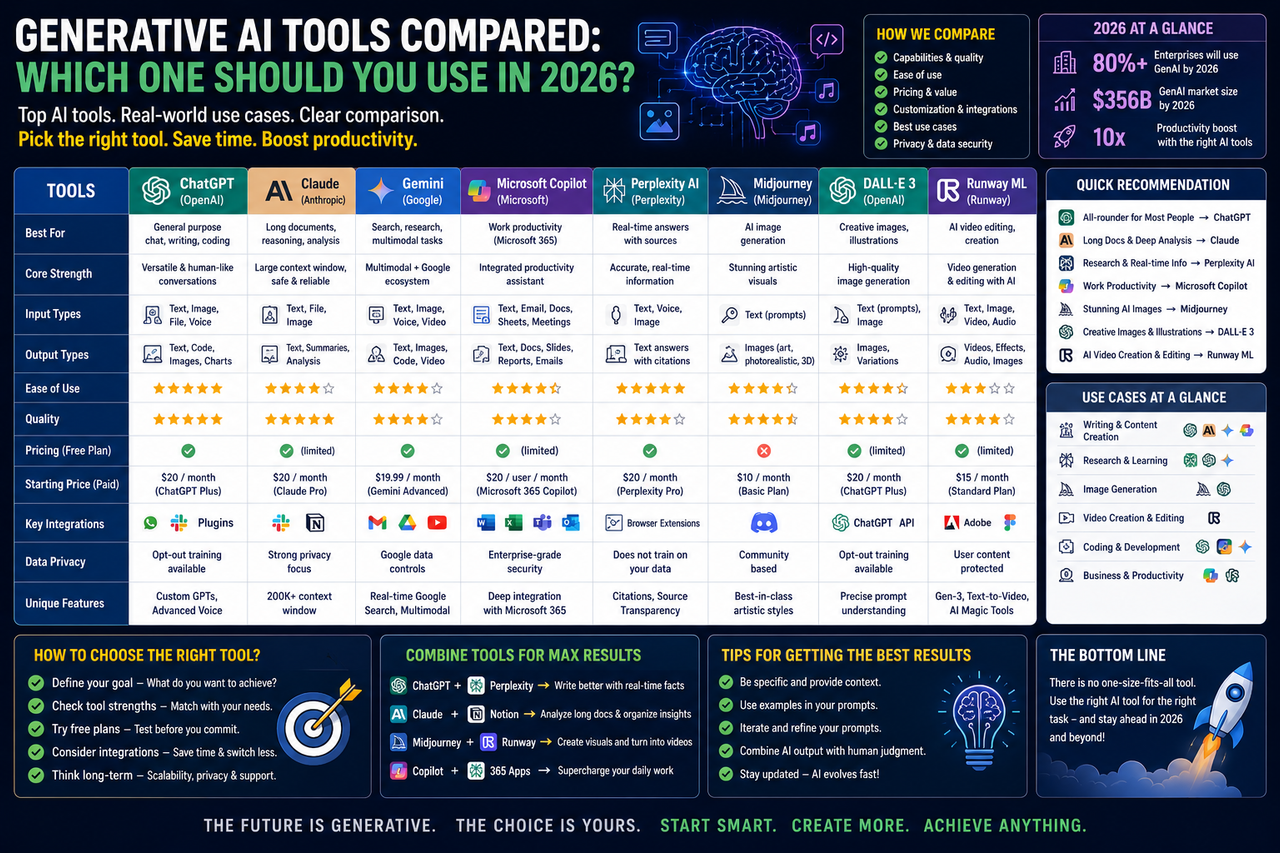
Generative AI Tools Compared:
Which One Should You Use in 2026
Generative AI has moved from
being a novelty to becoming a daily tool for students, developers and working
professionals. By 2026, there are multiple mature AI assistants available, each
with slightly different strengths, and choosing the right one depends heavily
on what task is being performed.
Why the Choice of Tool
Matters
Not every AI assistant is built
the same way. Some are optimized for long-form writing and research, others for
coding and debugging, and some for quick everyday questions. Using the wrong
tool for a task often means more editing and correction later, which defeats
the purpose of using AI in the first place.
Categories of Generative AI
Use
● Coding and debugging: Tools
designed to understand programming languages, suggest fixes and explain errors
line by line.
● Writing and content creation:
Tools optimized for tone, structure and long-form content such as blog posts,
reports and documentation.
● Research and summarization:
Tools that can process large documents and extract key points quickly.
● Image and design generation:
Tools focused on visual content, useful for presentations, branding and social
media.
● Data analysis: Tools that can
interpret spreadsheets, generate charts and explain trends in plain language.
How Students Should Approach
AI Tools
For engineering students, the
most practical approach is to use AI assistants as a second opinion rather than
a replacement for understanding. When working on a final-year project, for
example, AI can help debug code faster, but the student should still be able to
explain every part of the system during the viva.
Cost and Accessibility
Considerations
Many AI tools now offer free
tiers with usage limits, which is often enough for students working on
assignments and small projects. For heavier, professional use, paid
subscriptions typically unlock faster response times, larger context windows
and more advanced features.
Choosing Based on Your Needs
If your primary need is coding
support, look for a tool with strong integration into your code editor. If your
focus is writing and documentation, prioritize a tool known for structured,
well-organized long-form output. If you work heavily with data, prioritize
tools with strong spreadsheet and chart capabilities.
Final Verdict